Step Infographic PowerPoint Template: A Practical Choice for Clear Process Visualization
When presenting a multi-stage workflow—whether it’s a customer onboarding journey, a project lifecycle, or a lesson plan—the clarity of your visual structure directly affects audience comprehension. The Step Infographic PowerPoint Template is a purpose-built resource designed specifically for this challenge: turning sequential, procedural, or phased information into clean, intuitive, and professional slide visuals. Unlike generic layout packs or abstract design themes, this template centers entirely on step-by-step storytelling—using numbered progression, consistent iconography, and intentional spatial hierarchy to guide attention logically from start to finish.
What Sets This Template Apart
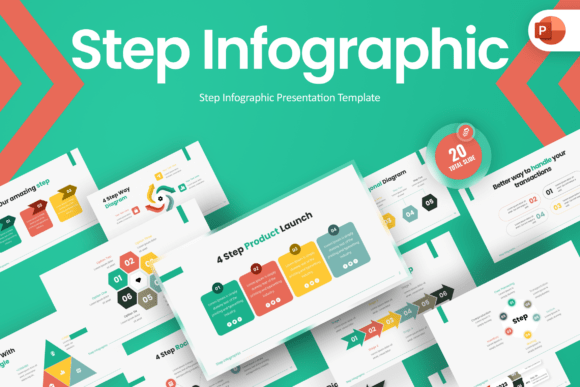
At its core, the Step Infographic PowerPoint Template prioritizes function over decoration. Its bold teal and green color scheme isn’t just stylistic—it’s functional. These high-contrast, accessible tones improve readability while supporting visual grouping across steps, making transitions between stages perceptible at a glance. Each step is anchored by a clean, editable icon—simple enough to scale without losing clarity, distinctive enough to reinforce meaning (e.g., a gear for “implementation,” a checkmark for “validation”). The 16:9 widescreen ratio ensures compatibility with modern projectors and screens, and every element—including text boxes, shapes, and connectors—is fully editable in standard PowerPoint.
Unlike templates that rely on embedded raster images or locked layers, this one delivers true flexibility: no design software required, no external dependencies beyond PowerPoint, and no hidden limitations on customization. The included help guide walks users through common edits—reordering steps, swapping icons, adjusting color variants—without assuming prior design experience. It also bundles a free font that supports both Latin and extended character sets, eliminating licensing concerns during internal or client-facing use.
How It Compares to Other Visual Communication Options
Many presenters default to building step diagrams from scratch—or worse, repurposing unrelated templates. Others turn to online infographic tools, Canva layouts, or even static image files. Each option carries tradeoffs:
- Building from scratch offers maximum control but demands time, consistency discipline, and design judgment—especially when aligning spacing, typography, and icon style across multiple slides.
- Online infographic generators often limit export quality (e.g., low-res PNGs), restrict editing after download, or lock advanced features behind subscriptions. They also rarely support seamless integration into existing PowerPoint decks.
- Generic PowerPoint templates may include “step”-labeled slides, but those are frequently decorative rather than structural—lacking consistent numbering logic, scalable icon systems, or logical flow directionality (left-to-right, top-to-bottom, circular, etc.).
The Step Infographic PowerPoint Template sits deliberately between these options: more structured than a blank canvas, more adaptable than a web-based tool, and more focused than a broad presentation theme. It doesn’t try to be everything—it solves one problem well: translating linear processes into coherent, presentation-ready visuals.
Strengths and Real-World Fit
This template shines in contexts where accuracy, repeatability, and clarity outweigh novelty. Project managers use it to map sprint phases or risk mitigation workflows—keeping stakeholders aligned without requiring interpretation. Educators apply it to scaffold learning objectives, breaking complex topics (like scientific method or historical cause-and-effect) into digestible, numbered segments. Corporate trainers deploy it for compliance onboarding, where sequence matters legally and operationally.
Its strength lies in consistency—not just visually, but cognitively. Because each step follows the same visual grammar (icon + number + concise label + optional description), audiences learn the pattern quickly and retain the content more effectively. Research in instructional design shows that consistent visual scaffolding reduces cognitive load, particularly for adult learners processing new procedural knowledge.
Tradeoffs and Limitations to Consider
No template eliminates all constraints—and understanding them helps avoid mismatched expectations. First, this is a PowerPoint-native solution. If your team relies exclusively on Google Slides or Apple Keynote, you’ll need to convert or recreate elements manually, potentially losing layer fidelity or animation triggers. Second, while icons and colors are editable, the template does not include licensed stock imagery—so if your process requires custom photos or illustrations (e.g., real team members in a “handoff” step), you’ll source those separately.
Third, it’s optimized for linear or branching sequences—not cyclical models (like PDCA loops) or matrix-based frameworks (e.g., quadrant analyses). While you can adapt individual slides for non-linear flows, doing so requires more manual restructuring than with a dedicated cyclical or grid-based template. Finally, although the font is free and embedded, users needing multilingual support beyond basic Latin scripts (e.g., Arabic, Devanagari) may need to substitute fonts and verify glyph coverage.
When It’s the Right Choice—and When It’s Not
The Step Infographic PowerPoint Template is likely the right choice if you regularly prepare presentations that explain how something happens in order—especially when those presentations serve mixed audiences (technical and non-technical), require frequent updates, or must maintain brand alignment across departments. Its editability means one person can build a master version, then others can customize for specific teams or regions without redesigning from zero.
It’s less ideal if your primary need is rapid, one-off visual creation for social media or email—where lightweight, single-image outputs are preferred—or if your processes involve heavy data visualization (e.g., dynamic charts tracking KPIs per stage), which this template doesn’t incorporate natively. Similarly, if your organization mandates strict accessibility compliance (e.g., WCAG 2.1 AA), you’ll need to verify screen reader behavior for numbered lists and alt-text for icons—a step the template enables but doesn’t automate.
Practical Customization Tips
Getting the most from the Step Infographic PowerPoint Template doesn’t require design expertise—just intentionality. Start by auditing your content: trim verbose step descriptions to one clear phrase per stage, and ensure numbering reflects actual dependency (not just preference). Use the built-in color variants to signal status—e.g., teal for active steps, muted green for completed ones—without adding clutter.
For educator users: pair each step with a brief facilitation note in the slide comments field (not visible in presentation mode) to remind yourself of key discussion points. For consultants: duplicate slides to create parallel versions—one showing “as-is” and another “to-be”—using identical styling to highlight contrast without visual noise.
Remember, the goal isn’t visual complexity—it’s cognitive efficiency. A well-executed step infographic doesn’t draw attention to itself; it quietly supports understanding. That’s where the Step Infographic PowerPoint Template delivers: not flash, but function—structured, reliable, and ready when your next process needs to be seen, not just described.