Spiral Infographic PowerPoint Template: Visualize Growth, Process, and Progress with Clarity
Have you ever tried to explain a multi-stage journey—like launching a startup, guiding learners through skill mastery, or rolling out a new product—and found that linear timelines just don’t capture the nuance? That’s where the Spiral Infographic PowerPoint Template steps in—not as a flashy gimmick, but as a thoughtful, human-centered design tool built for complexity that unfolds over time.
Why the Spiral Shape Works—Beyond Aesthetics
The spiral isn’t just visually striking; it mirrors how many real-world processes actually behave. Unlike rigid step-by-step flows, growth, learning, strategy, and innovation often involve looping back, deepening understanding, refining approaches, and building on earlier layers. Think of onboarding a new team member: they revisit core concepts at increasing levels of responsibility. Or consider agile project management—each sprint circles back to planning, review, and adaptation, gaining momentum with every turn.
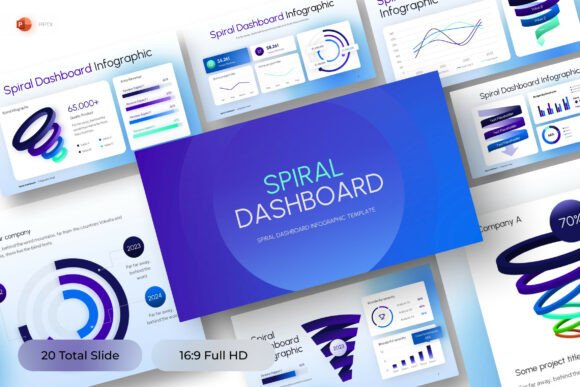
The Spiral Infographic PowerPoint Template leverages this natural rhythm. Its concentric, outward-winding layout gives viewers immediate spatial intuition: inner rings signal foundations; outer arcs represent expansion, maturity, or advanced outcomes. It doesn’t flatten complexity—it honors it.
What’s Inside the Template Package?
This isn’t a static image or locked design. The Spiral Infographic PowerPoint Template arrives as a fully editable, ready-to-use resource crafted for practicality—not just presentation polish. Here’s what you’ll find:
- One clean, 16:9 widescreen PowerPoint slide—optimized for modern displays, projectors, and virtual meetings;
- Fully editable vector shapes and text boxes—no design skills needed to swap labels, adjust colors, or reposition elements;
- A free, web-safe font included—so your text renders consistently across devices and platforms;
- A concise help guide—with tips on customizing color schemes, adding icons, and adapting the spiral for different content types;
- All source files in native .pptx format—no hidden layers, no password protection, no surprises.
Note: Stock images aren’t bundled—but that’s intentional. It encourages you to insert your own brand-aligned visuals, team photos, or custom illustrations—keeping the final output authentic and purpose-built.
Who Benefits Most—and How?
The Spiral Infographic PowerPoint Template shines brightest when the story you’re telling has depth, iteration, or evolution at its core. Here’s where it adds tangible value:
Educators & Trainers
Use it to map competency development—say, from “basic coding syntax” at the center to “designing scalable applications” at the outer rim. Learners see not just *what* comes next, but *how far they’ve come*.
Startup Founders & Product Managers
Illustrate your go-to-market roadmap: customer discovery → MVP testing → early traction → scaling infrastructure → ecosystem integration. Each loop reflects growing insight, not just elapsed time.
HR & Learning & Development Teams
Visualize leadership development paths—self-awareness → feedback integration → coaching others → strategic influence. The spiral shows progression as layered growth, not isolated promotions.
Consultants & Freelancers
Frame your service methodology: discovery → analysis → co-creation → implementation → refinement. Clients instantly grasp your commitment to ongoing partnership—not one-off deliverables.
Strengths You Can Rely On
• Clarity without oversimplification. Unlike circular diagrams that imply repetition without progress, the spiral’s outward motion conveys forward momentum—even when revisiting themes.
• Adaptability across contexts. Whether you’re explaining climate resilience stages to municipal planners or mapping student wellness support tiers in a school district, the structure stays intuitive.
• Accessibility-friendly foundation. With clear hierarchy, sufficient contrast (when customized thoughtfully), and editable text, it supports inclusive communication—especially when paired with descriptive alt text in final decks.
• Time efficiency. No need to build from scratch in Illustrator or wrestle with alignment grids. In under 10 minutes, you can populate, recolor, and present a polished visual.
Realistic Considerations—What It’s Not Designed For
While versatile, the Spiral Infographic PowerPoint Template works best when your content fits its inherent logic. It’s less ideal for:
- Strictly linear, non-iterative sequences—e.g., “order form → payment → shipping confirmation.” A simple flowchart or timeline serves better there.
- Highly technical system architectures—where bidirectional data flows or conditional branching dominate. Spirals prioritize narrative cohesion over granular logic mapping.
- Print-heavy materials requiring CMYK precision—since it’s built for digital-first use (PowerPoint, Google Slides export, PDF handouts), fine-tuning for offset printing may require additional prep.
Also, while all elements are editable, the template doesn’t auto-generate animations or interactive hotspots. Those enhancements remain manual—but that’s by design. It keeps focus on your message, not distracting motion.
Making It Your Own: Practical Customization Tips
You don’t need design expertise—just intention. Try these low-effort, high-impact tweaks:
- Start with your anchor concept. Place your foundational idea—or first milestone—in the innermost ring. Keep wording concise: “Awareness,” “Discovery,” “Core Values.”
- Use color deliberately. Apply subtle hue shifts (e.g., light blue → medium blue → deep blue) across rings to reinforce progression—not random variety.
- Add minimal icons. A small, consistent icon set (e.g., lightbulb → gear → graph → globe) reinforces meaning without clutter.
- Label key transitions. Add short phrases along the spiral path: “After 3 months,” “Post-pilot feedback,” “When team reaches 10 members.” Context turns abstract shape into lived experience.
- Export smartly. Save as PDF for handouts (preserves fonts), or export individual slides as PNGs for social media snippets—with a brief caption like “How our mentorship program grows with you.”
Is This the Right Fit for Your Next Project?
Ask yourself:
- Does my audience benefit from seeing growth or change as layered, cumulative, and reflective—not just sequential?
- Am I trying to convey that early stages inform later ones—and that “completion” isn’t an endpoint, but a platform for the next cycle?
- Do I need something professional-looking, fast to adapt, and compatible with tools my team already uses daily?
If two or more answers are “yes,” the Spiral Infographic PowerPoint Template is likely a strong match. It won’t replace deep strategy work—but it will make that strategy easier to share, remember, and act on.
Final Thought: Design That Serves Understanding
In a world saturated with bullet-pointed decks and generic stock graphics, clarity is a competitive advantage. The Spiral Infographic PowerPoint Template doesn’t dazzle—it clarifies. It doesn’t impress—it invites. And most importantly, it meets your audience where they are: seeking meaning, not decoration. Whether you’re guiding a team through transformation, helping students see their potential, or aligning stakeholders around long-term vision, this template offers structure that breathes with your ideas—not against them.
Ready to move beyond flat timelines? The spiral isn’t just a shape—it’s a mindset. And with this template, that mindset starts with one editable slide.