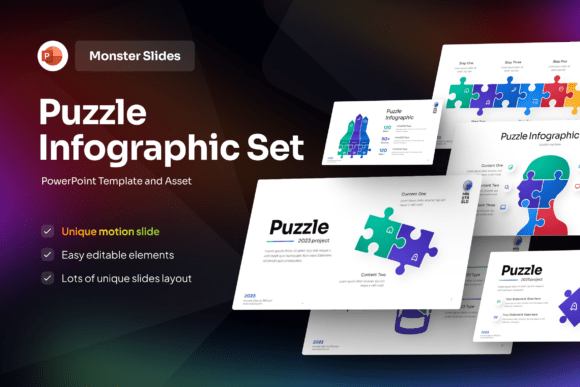
Puzzle Infographic PowerPoint Template
Imagine explaining how your team’s roles fit together—like interlocking puzzle pieces—without relying on bullet points or confusing flowcharts. That’s exactly what the Puzzle Infographic PowerPoint Template helps you do: turn abstract ideas into clear, visual stories where every element connects meaningfully.
What It Is—And Why It Works
This isn’t just another slide deck with clipart. The Puzzle Infographic PowerPoint Template is a thoughtfully built presentation resource centered around puzzle-shaped infographic elements. Each piece represents a concept, step, department, or value—and when arranged, they form a cohesive whole. It’s designed for people who need to show relationships: how marketing, sales, and support align; how learning modules build on one another; or how sustainability goals connect across departments.
Its strength lies in simplicity with purpose. The puzzle motif intuitively signals collaboration, integration, and completeness—making complex systems feel approachable. And because it’s built in PowerPoint, it works seamlessly with tools most people already use daily.
Who Benefits—and How
If you’ve ever spent hours trying to make a process diagram look professional—or struggled to get stakeholders to see the big picture—the Puzzle Infographic PowerPoint Template offers real relief. Educators use it to map curriculum pathways. Startup founders visualize go-to-market strategies. Marketing teams break down customer journey stages. Freelancers showcase service packages as complementary offerings—not isolated tasks.
Take a small business owner launching a new product line. Instead of listing features in a table, they arrange five puzzle pieces labeled “Research,” “Design,” “Testing,” “Launch,” and “Feedback”—each color-coded and sized to reflect effort or timeline. Instantly, the audience grasps sequence *and* interdependence.
Or consider a high school science teacher introducing ecosystems. Rather than describing food webs verbally, they drop species names into puzzle segments—predator, prey, decomposer—then animate them snapping together. Students remember the connections, not just the terms.
Designed for Real-World Flexibility
The template includes 16 fully editable slides in widescreen (16:9) format—ideal for modern projectors, Zoom screens, and exported PDFs. Every shape, text box, icon, and color can be changed in seconds. No design degree required.
A few standout features make day-to-day use smooth:
- Free font included—so your slides look polished even if you don’t have premium fonts installed.
- No hidden layers or locked objects—everything is truly editable, right down to individual puzzle segments.
- Help guide included—a concise PDF walks through customization steps, common edits, and best practices for layout balance.
- Image-ready placeholders—though stock images aren’t bundled, each slide has clearly marked spots where you can add your own photos, charts, or icons.
You’re not locked into a single style either. Swap blues for earth tones to match your brand. Adjust puzzle sizes to emphasize priority areas. Stack pieces vertically for linear processes or arrange them circularly for cyclical concepts like feedback loops or agile sprints.
Where It Fits Naturally
This template shines wherever clarity and connection matter more than decoration. In board meetings, it turns strategic pillars into memorable visuals. In grant proposals, it shows how community partners, resources, and outcomes interlock. For online course creators, it structures module sequences so learners understand progression—not just content order.
It also supports hybrid workflows. Export a slide as PNG for social media snippets. Paste a puzzle graphic into a Notion dashboard. Use one layout as a handout while animating the same concept live during a workshop.
Even casual users find value. A parent planning a family budget might assign puzzle pieces to “Income,” “Housing,” “Education,” “Savings,” and “Leisure”—then rearrange them during a conversation to explore trade-offs. Visual thinking doesn’t require corporate stakes to be useful.
Things to Keep in Mind Before You Start
While the Puzzle Infographic PowerPoint Template is intuitive, a few practical notes help avoid hiccups:
- Images aren’t included—but that’s intentional. It gives you full control over visuals that reflect your voice, audience, or industry. Just make sure any photos or icons you add are licensed for commercial or personal use, depending on your needs.
- Customization is easy—but thoughtful editing matters. Don’t overcrowd pieces with text. Let white space breathe. If a concept needs explanation, put it in speaker notes—not crammed inside a tiny puzzle segment.
- Test readability early. Puzzle shapes vary in size and angle. Preview slides at 100% zoom and from across the room (or on a phone screen) to ensure labels stay legible.
- It’s PowerPoint-native, so compatibility is excellent—but if you’re using Google Slides or Keynote regularly, plan to copy-paste elements rather than open the file directly. Shapes and fonts will transfer cleanly, though animations may need re-adding.
Also worth noting: this isn’t a data-dense dashboard tool. If you need live charts, dynamic filters, or complex calculations, pair it with Excel or Power BI instead of expecting those functions here. Its power is in storytelling—not number crunching.
A Tool That Grows With You
Beginners appreciate how quickly they can produce something presentation-ready. Seasoned designers love its clean vector-based foundation—they can extend it with custom illustrations or motion paths without fighting the structure. And because it’s built on familiar software, there’s no learning curve to adopt yet another platform.
Over time, many users keep a “master version” of the template with their brand colors, logo placement, and favorite layouts saved. They duplicate it for each new project—tweaking only what’s needed. That kind of efficiency adds up: less formatting, more focus on message.
At its core, the Puzzle Infographic PowerPoint Template answers a quiet but constant need—to be understood. Not just heard, not just seen, but truly *grasped*. When ideas fit together visibly, confidence rises. Questions decrease. Alignment deepens. That’s not design magic. It’s thoughtful structure—made accessible.